

 English Malay
  China
China  Türkiye
  France
  Spain
Spain  Vietnamese
  Thailand
  India
India  Русский
  Japan
Japan  Arabic
  Mexico
  Peru
Peru  Argentina
  Korea
Korea  Eng-Canada
  Cambodia
  Philippines
  Bangladesh
  Hong Kong
  Australia
  Singapore
  Colombia
  Iran
Iran What is the Forex Factory Calendar? Why do traders need to know it?
In fundamental analysis, the Forex Factory Calendar is considered a “compass” for all financial traders. It is the most detailed online economic calendar, providing information on economic events, political reports, and financial indicators that directly affect the value of currencies.
At Wemastertrade, we always emphasize that: Even if you are a purely technical analysis trader, ignoring the economic calendar is a fatal mistake. Extremely volatile price movements often stem from “Actual” figures that differ significantly from “Forecast” figures, and Forex Factory is the place to get the fastest updates on this data.
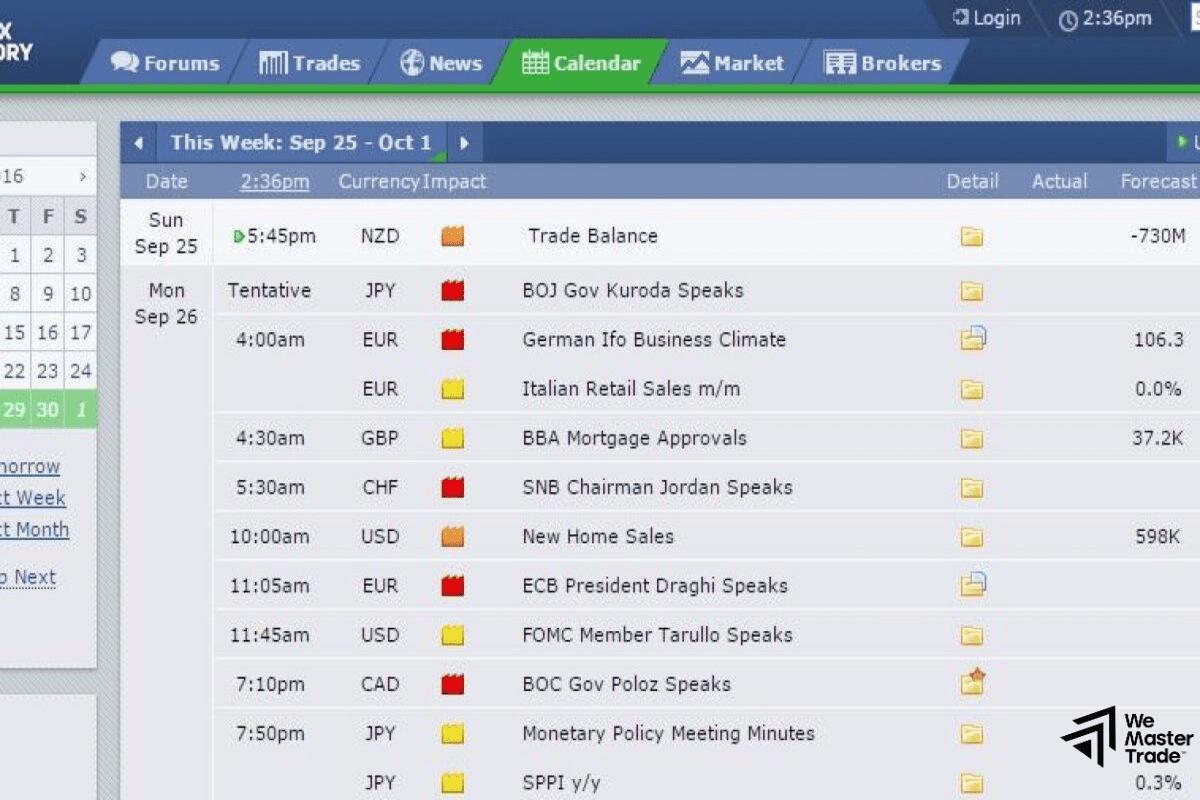
Guide to installing Forex Factory for Vietnamese traders
To use it effectively, the first and most important step is to synchronize this tool with your trading environment.
Time Zone Synchronization
Many beginners often confuse news release times with local time.
- Step 1: Access Forex Factory.
- Step 2: Click on the time section in the upper right corner.
- Step 3: Select the time zone (GMT +7:00) Bangkok, Hanoi, Jakarta.
- Step 4: Click “Save Settings”. This helps you know exactly what time the news will be released in Vietnam, avoiding being caught off guard by important news releases.
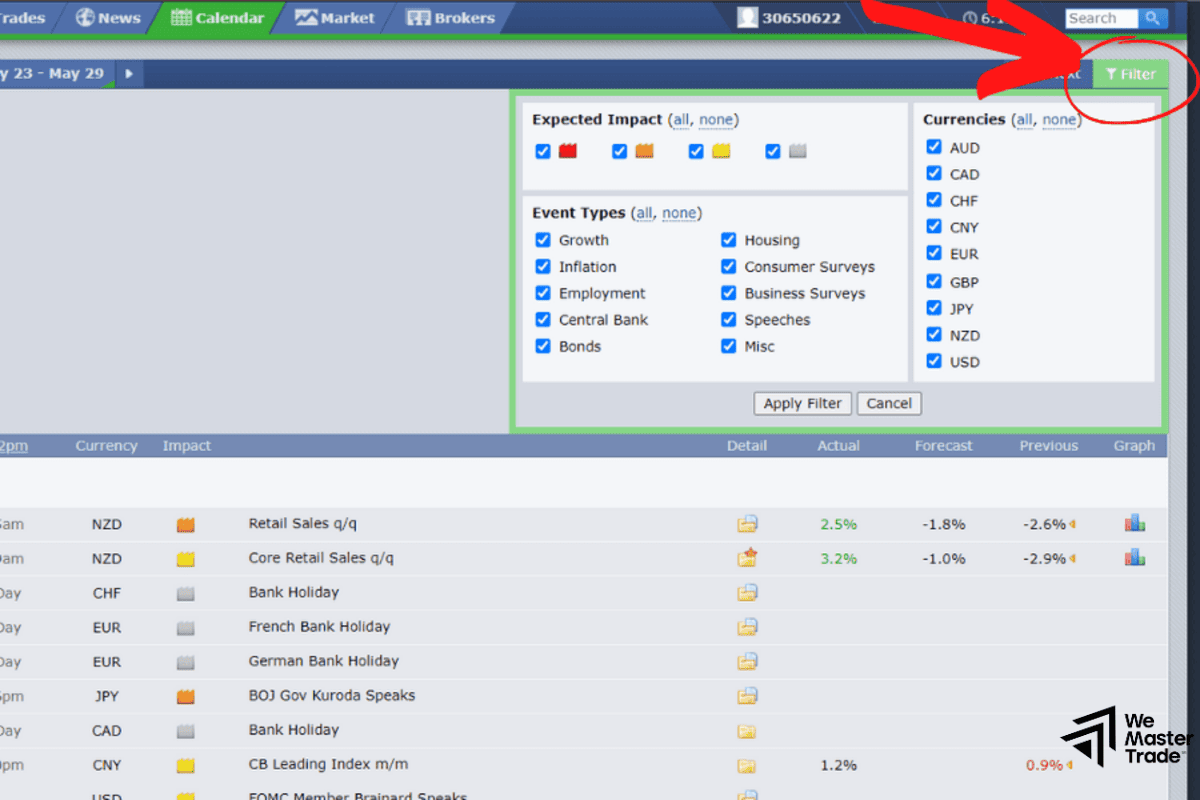
Using Filters Effectively
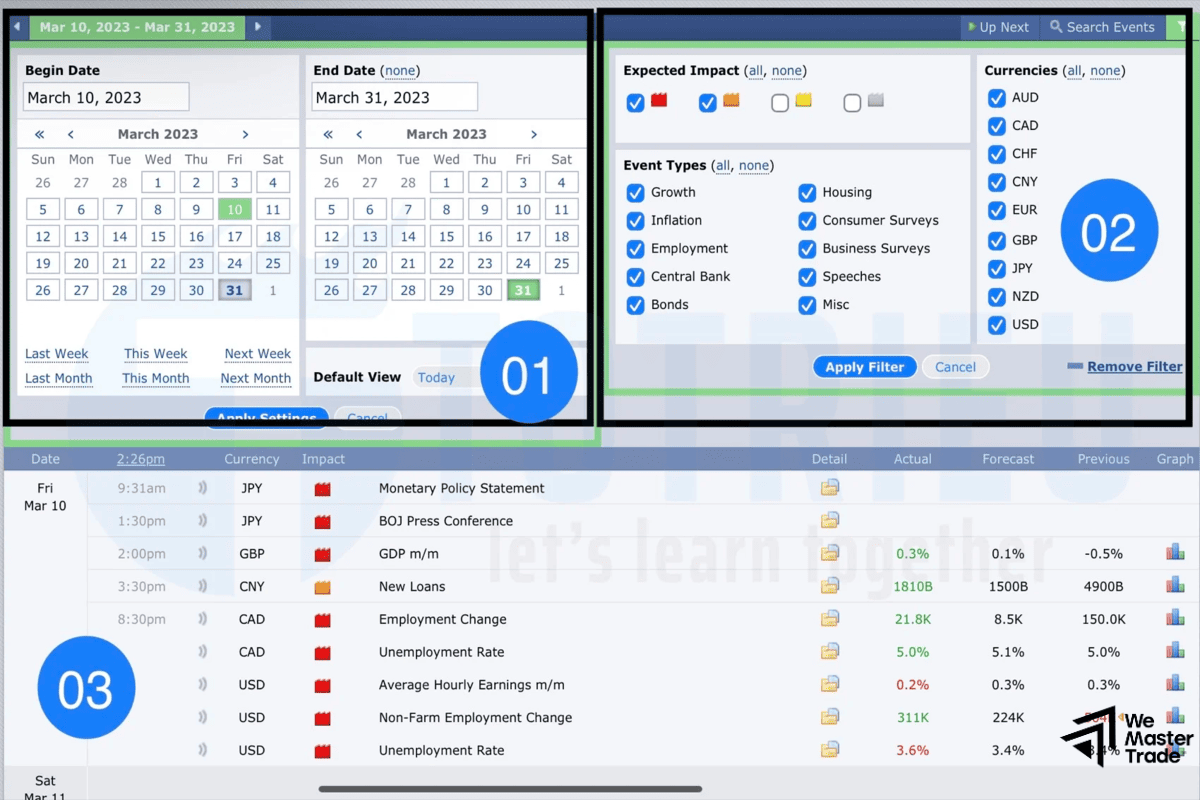
Every day there are dozens of news items, but not all of them are worth paying attention to. Wemastertrade recommends filtering as follows:
- Impact: Only select Red News (Strong Impact) and Orange News (Medium Impact).
- Event Types: Select all types of indicators from GDP, CPI to central bank interest rates.
- Currencies: Only select the currencies you are trading (e.g., USD, EUR, Gold).
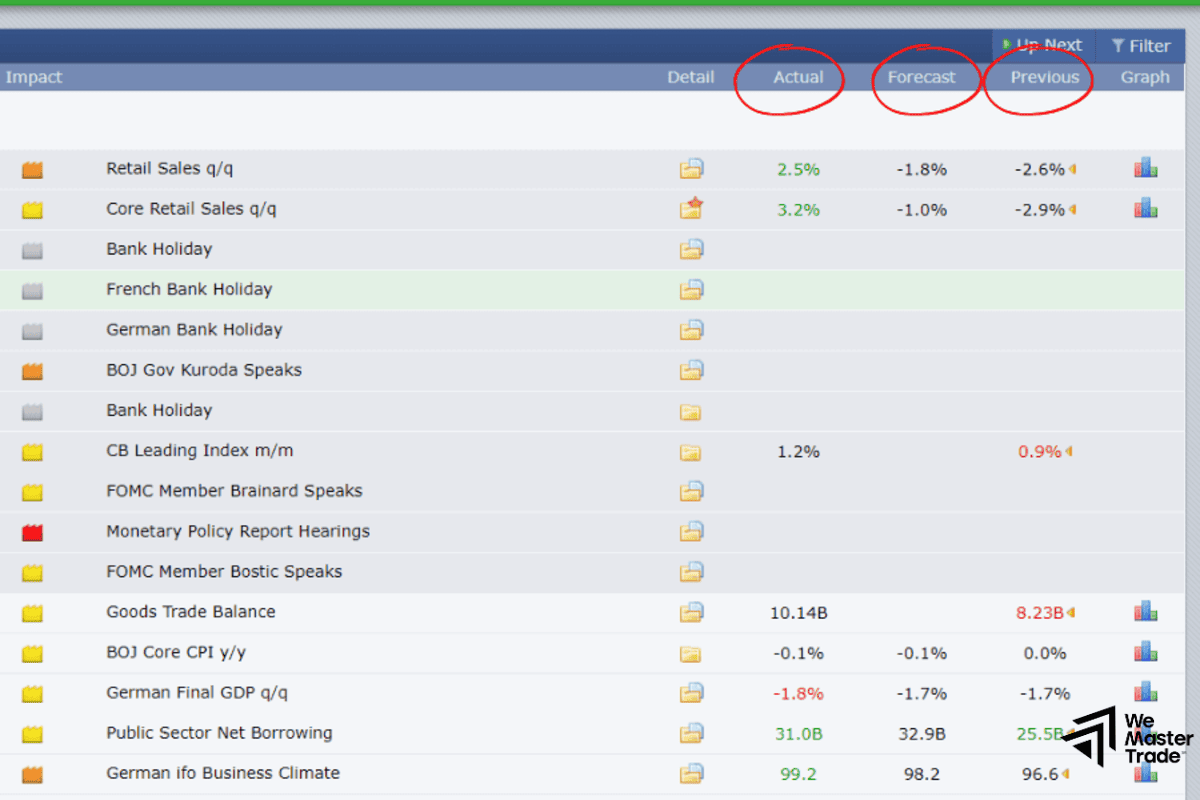
How to Understand Economic Parameters in Forex Factory
To forecast the market, you need to understand the meaning of the data columns:
- Actual: The number released at the current time.
- Forecast: The number that economic experts expect.
- Previous: The number from the previous period.
Basic Principles:
- If Actual > Forecast (with good news like GDP, CPI): This usually causes the currency to appreciate.
If Actual < Forecast: This usually causes the currency to depreciate.
However, the Forex market isn’t always that simple. Sometimes, even with good news, the price still falls (the news has already “priced in”). This is where practical experience from Wemastertrade will help you identify price traps.
Analyzing Key Factors: Red News and Market Volatility
In the Forex Factory ecosystem, red news are factors that have the power to change short-term or even long-term trends.
- Non-Farm Payrolls (NFP): The US non-farm payrolls report, released on the first Friday of the month. This is the biggest “storm” causing gold (XAUUSD) and other USD pairs to fluctuate by hundreds of pips in just a few minutes.
- Interest Rates: The decisions of the FED (US) or ECB (Europe) on interest rates are always a focal point. Rising interest rates usually lead to an appreciation of the currency.
- CPI (Consumer Price Index): A measure of inflation. In the current economic context, the CPI is key to predicting the next steps of central banks.
Market Forecasting Strategies from Wemastertrade
Based on data from the Forex Factory Calendar, you can build a news trading strategy in 3 steps:
- Before the news is released: Observe the difference between the Forecast and the Previous. If the gap is too large, the market is usually prepared (market sentiment).
- When the news is released: Do not enter a trade immediately. System lag and spread widening on the exchange can wipe out your account. Wait for the Actual number to appear.
- After the news is released: Analyze the price reaction at support/resistance zones. If the news is extremely good but the price fails to break through resistance, that could be a sign of a reversal.
Risk Management When Trading According to the Economic Calendar
With years of experience in the market, the Wemastertrade team understands that: Economic data is the foundation, but discipline is what brings profit.
- Never go all-in on news: News volatility can cause slippage, rendering your stop-loss point ineffective.
- Combine technical analysis: Use Forex Factory to know “when” the market will fluctuate, and use charts to know “where to enter a trade”.
- Always check for unexpected developments: Sometimes quick news not on the calendar can also change the situation.
Frequently Asked Questions (FAQs)
Does Forex Factory have a Vietnamese version?
Currently, the website doesn’t have an official Vietnamese version, but you can use Google Translate integrated into your browser. However, for technical terms, it’s best to read them in English for the most accurate results.
Why is the Actual price still falling even though it’s good?
This is the “Buy the rumor, sell the news” phenomenon. The market has already reflected expectations about the price beforehand.
Which economic calendar is the best right now?
Forex Factory remains the number one choice due to its strong community and intuitive interface. However, you can also refer to Investing or DailyFX for comparison.
- How to Use and Customize MT4 Charts : Setting Up Your Interface Like a Funded Trader
- What Is an MT4 VPS? Why Traders Using Robots (EA) Must Have a VPS
- Backtesting Trading Strategies on MT4: The “Acid Test” Before Getting Funded
Conclusion
Mastering the Forex Factory Calendar not only helps you avoid devastating market sweeps but also opens up opportunities to profit from large fluctuations. Always remember: Economic data is the foundation, but the ability to read and understand market psychology is the key to becoming a Master Trader.
Hopefully, this guide from Wemastertrade has given you a deeper understanding of this tool. Don’t forget to follow us for updates on the most practical trading strategies!