

 English Malay
  China
China  Türkiye
  France
  Spain
Spain  Vietnamese
  Thailand
  India
India  Русский
  Japan
Japan  Arabic
  Mexico
  Peru
Peru  Argentina
  Korea
Korea  Eng-Canada
  Cambodia
  Philippines
  Bangladesh
  Hong Kong
  Australia
  Singapore
  Colombia
  Iran
Iran Drawing a Trendline MT5 is not difficult, but drawing it correctly to “read the market’s pulse” is a challenge for many new traders. Are you struggling with messy lines or don’t know how to turn off the annoying Ray extension? This article by Wemastertrade will guide you step by step to master the Trendline tool, from basic settings to in-depth technical thinking, helping your chart become professional instantly.
Why is Trendline an “indispensable” tool on MT5?
In technical analysis (Technical Analysis), “Trend is your friend” is a classic mantra. However, to identify this friend, you need a visual tool—and that is the Trendline.
On the MetaTrader 5 (MT5) platform, a Trendline is not just a simple line connecting highs and lows. For professional traders at Wemastertrade, it plays the role of:
-
Dynamic Support & Resistance: Unlike fixed horizontal lines, trendlines move with price, indicating potential reaction zones in the future.
-
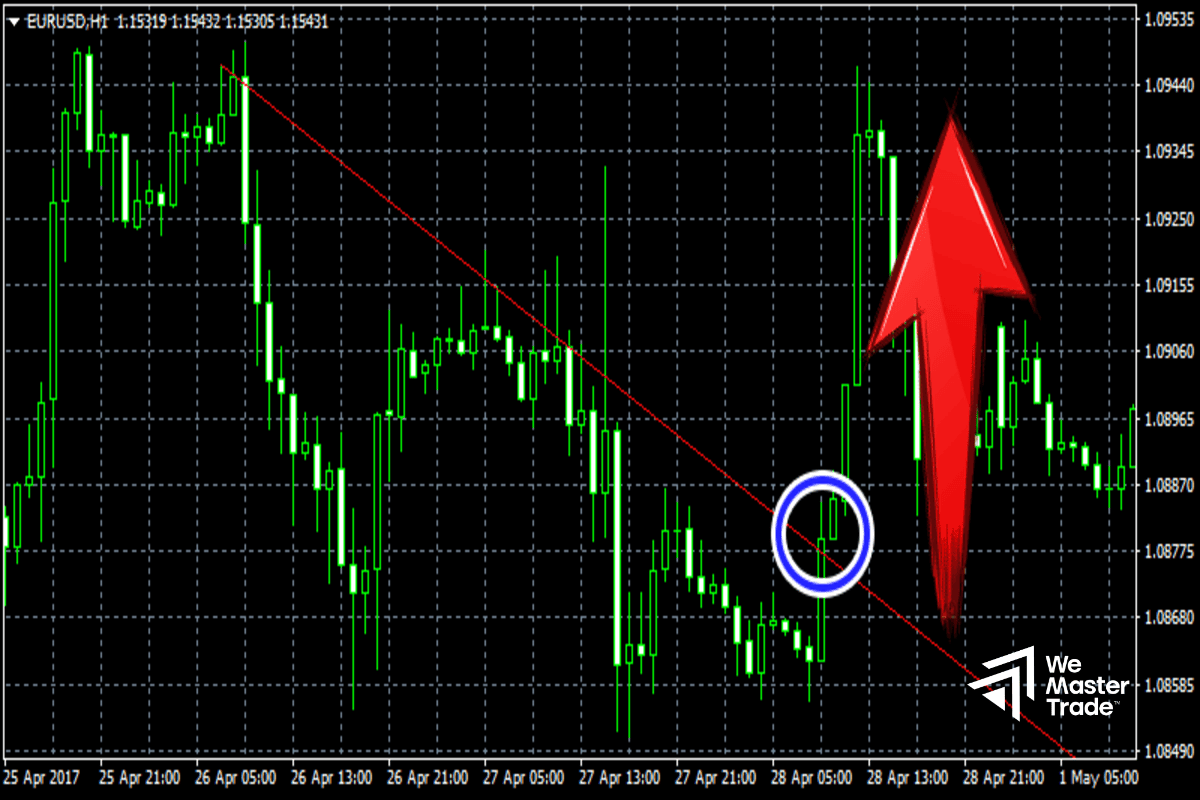
Breakout identification tool: Helps identify when the market structure changes (from bullish to bearish or vice versa).
-
Noise filter: Helps traders avoid entering trades against the main trend.
How to Draw Trendline on MT5 (PC & Laptop)
To draw an accurate trendline on a computer, follow the standardized process of Wemastertrade below:
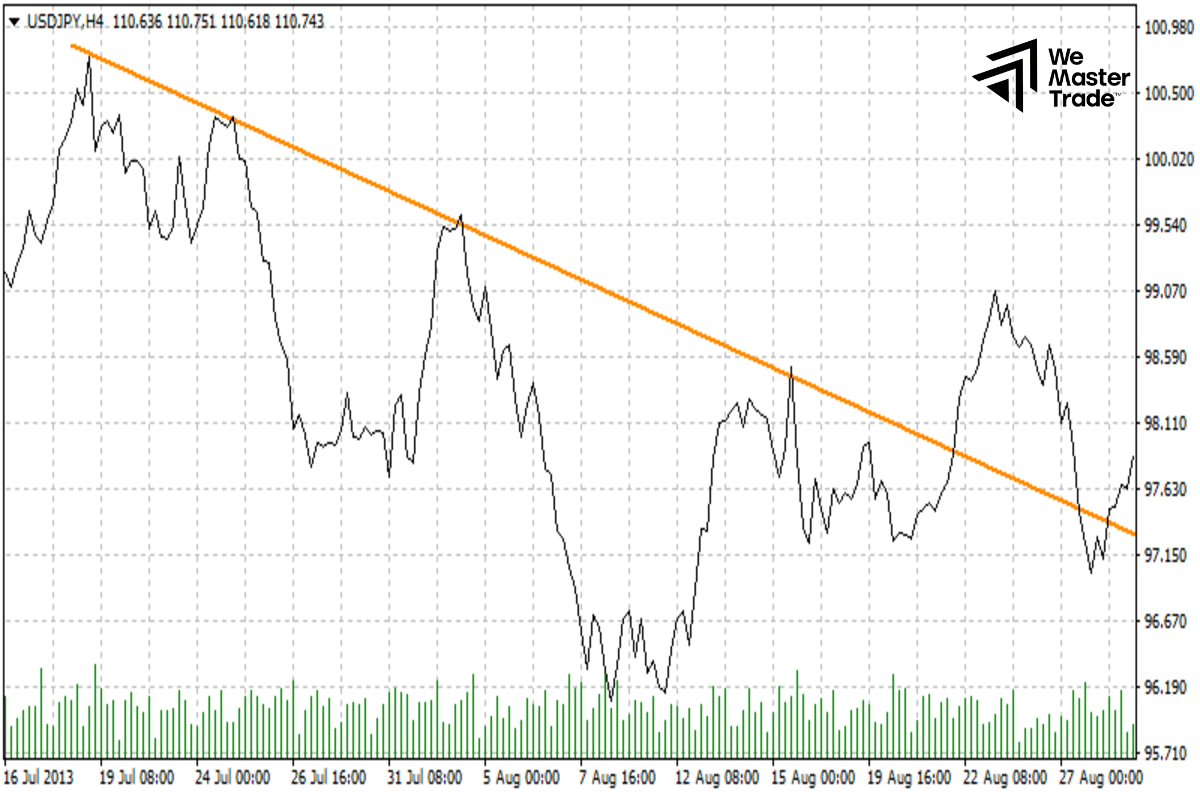
Step 1: Identify Swing High and Swing Low points
Before placing your mouse on the chart, you need to visually identify key points:
-
Uptrend: At least 2 lows (Swing Low), where the later low is higher than the previous one.
-
Downtrend: At least 2 highs (Swing High), where the later high is lower than the previous one.
Step 2: Activate the Trendline tool
On the MetaTrader 5 interface, there are 2 ways to select the tool:
-
Via Menu: Select Insert -> Objects -> Lines -> Trendline.
-
Via Toolbar: Click directly on the diagonal line icon (/) on the toolbar above the chart.
Step 3: Draw and adjust
-
Left-click on Low 1 (or High 1) and hold the mouse.
-
Drag the cursor to Low 2 (or High 2).
-
Release the mouse. MT5 will automatically display a straight line passing through these two points.
Important note from Wemastertrade: A trendline is considered “strong” and highly valuable when price touches it at least 3 times without being broken.
How to Turn Off the Infinite Ray Extension in MT5
This is the most frustrating issue for newcomers. By default, MT5 draws trendlines as a Ray extending infinitely to the right, making the chart cluttered.
To turn off this feature and make it a neat line segment, do the following:
-
Double click on the drawn trendline to select it (three small dots will appear at both ends and the middle).
-
Right-click and select Properties of that Trendline.
-
Switch to the Parameters tab.
-
Uncheck the Ray option.
-
Click OK.
From now on, the trendlines you draw will be neatly limited as desired.
How to Draw Trendline MT5 on Mobile
Trading on mobile phones is increasingly popular. Operations on the MT5 Mobile app (iOS/Android) are also very simple:
-
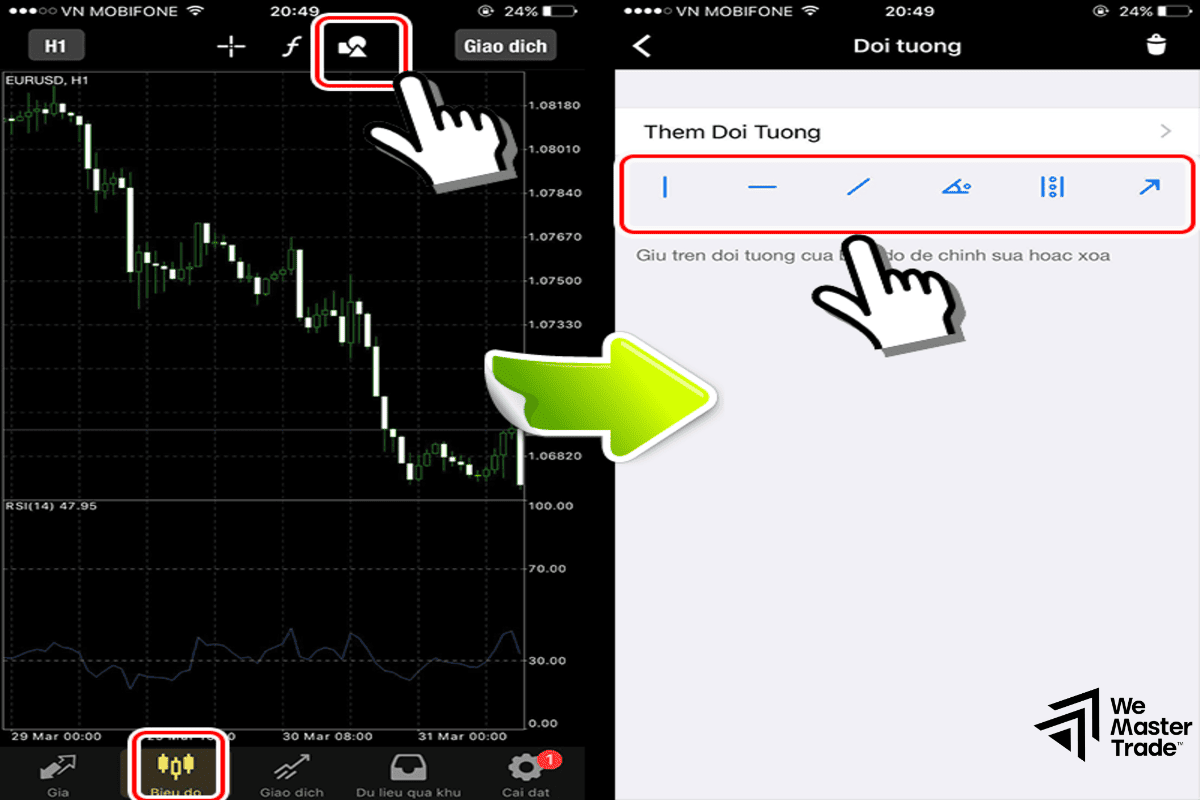
Tap lightly on the chart screen to bring up the wheel menu.
-
Select the shapes icon (Triangle/Circle/Square).
-
Tap the plus sign (+) to add an object, then choose Trendline.
-
Tap your finger on the starting point on the chart, drag to the second point, and release.
-
To edit (color, thickness, turn off Ray), press and hold the trendline and select the pencil icon (Edit).
“Pro” Trendline Tips for Effective Trading
At Wemastertrade, we don’t just draw—we optimize operations to be as fast and accurate as possible. Below are advanced tips:
1. Use the Clone shortcut
Instead of redrawing a parallel line to create a price Channel, you should:
-
Double click to select the original trendline.
-
Hold the Ctrl key on the keyboard.
-
Use the mouse to drag that trendline to a new position.
- Result: You get a perfect parallel line with the same slope.
2. Combine multiple timeframes (Multi-timeframe)
Don’t just draw on M15 or H1. Start drawing from higher timeframes (H4, D1) to see the big picture. Trendlines on higher timeframes are always more reliable and act as strong barriers.
3. The “Wick or Body?” rule
This is an eternal debate. Wemastertrade’s experience is: Be flexible.
-
Drawing through wicks (Shadows) often captures the full price action.
-
Drawing through candle bodies (Body) often filters out noise (Fakeouts).
- Best practice: Draw the trendline so that it passes through as many touchpoints as possible.
hình
Common Mistakes When Drawing Trendlines
If you find that price keeps breaking through your trendline and then returning, you may be making the following mistakes:
-
Forcing price into the line: You try to adjust the trendline to forcibly fit price points. Remember: The market is always right; your line is only a hypothesis.
-
Drawing too steep: A trendline with an overly steep angle (> 60 degrees) is often unsustainable and easily broken.
-
Not updating: When the trend changes its slope, you need to redraw or adjust a new trendline to match current price action.
See more:
- What Is Trade Explorer? 5 Ultra-Accurate Steps to Analyze Performance on Forex Factory
- Forex Factory Calendar Guide: Secrets to Market Forecasting
- VPS for MT5: The Complete Guide to Optimizing Automated Trading
Frequently Asked Questions (FAQs)
Below are quick answers to common questions from the Wemastertrade community:
1. How to set default colors for Trendline?
After adjusting colors and turning off the Ray in the Properties panel, don’t close it immediately. Look for the Set as Default button if available, or MT5 usually remembers your last settings for the next draw.
2. Why does the trendline disappear when switching timeframes?
You may have accidentally set it to display only on a specific timeframe. Go to Properties -> Visualization tab. Make sure All timeframes is checked.
3. Is there a tool that automatically draws Trendline on MT5?
Yes, you can find custom Indicators on the MQL5 Market. However, Wemastertrade recommends drawing manually to better train your market sense.
4. What is the shortcut key to draw a trendline in MT5?
MT5 does not have a default single shortcut key (like the L key) to draw immediately. You need to install additional scripts or use a customized Toolbar for fastest access.
Conclusion
Mastering how to draw Trendline MT5 is the first solid stepping stone on the path to becoming a professional trader. It is not just a line—it is the boundary between the Buy side and the Sell side.
Hopefully, this article by Wemastertrade has helped you resolve both technical and mindset issues when using this tool. Open your MT5 chart and start practicing today! If you want to explore deeper trading strategies with Trendline, don’t forget to follow our upcoming articles.