

 English Malay
  China
China  Türkiye
  France
  Spain
Spain  Vietnamese
  Thailand
  India
India  Русский
  Japan
Japan  Arabic
  Mexico
  Peru
Peru  Argentina
  Korea
Korea  Eng-Canada
  Cambodia
  Philippines
  Bangladesh
  Hong Kong
  Australia
  Singapore
  Colombia
  Iran
Iran Trading in the financial markets offers great opportunities but also carries many risks of “account blow-up.” MT5 risk management is not just a technique; it is a solid shield that protects your assets against unpredictable fluctuations. At Wemastertrade, we believe that sustainable profits only come when you know how to preserve money before making money. This article will provide the necessary toolkit and mindset: from how to calculate appropriate order volume (Lot size), using automated Scripts, to setting an optimal R:R ratio. Don’t let the market take your money—learn how to control the game starting now.
1. Why is risk management on MT5 a vital factor?
Many new traders often focus too much on finding good entry points (Entry) and forget that risk management is the factor that determines survival. The MetaTrader 5 (MT5) platform offers outstanding power in terms of speed and tools, but if not well controlled, it is also the place where your equity can evaporate the fastest.
According to experience from experts at Wemastertrade, there are 3 core reasons why you must tighten risk management:
-
Capital Protection: You cannot trade if you have no money left. Risk management helps you avoid deep drawdowns that make the account unrecoverable.
-
Control of trading psychology: When you clearly know the maximum amount you can lose on a trade, your psychology becomes steadier, avoiding panic that leads to wrong decisions.
-
Taking advantage of compound interest: Only when the original capital is preserved does generated profit become meaningful and create momentum for account growth.
2. Core components in MT5 risk management
To manage risk effectively on this platform, you need to master the following important factors:
2.1. Determining standard trading volume (Lot Size)
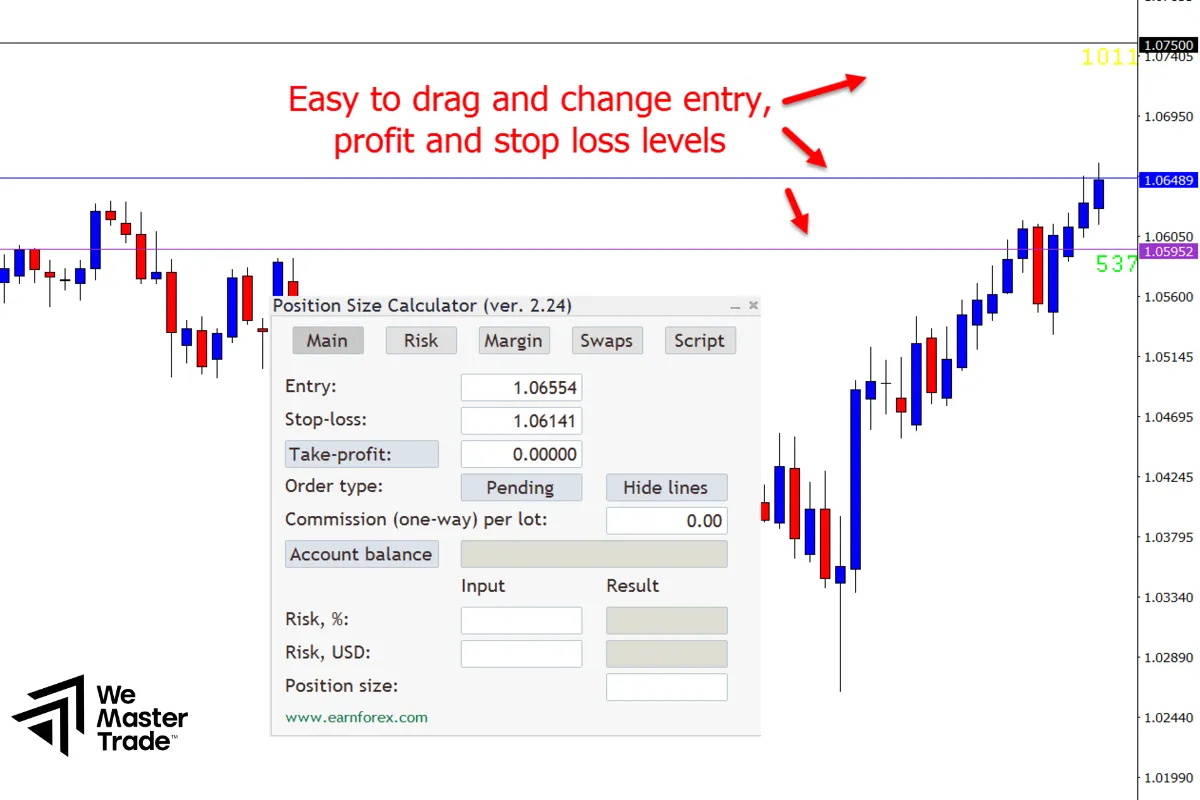
The biggest mistake is entering trades based on emotion (for example: “if I feel like it, I trade 1 lot”). You need to calculate lot size based on the amount of money you are willing to risk.
The basic formula recommended by Wemastertrade:
Lot = Risk Amount / Stop Loss Distance (Pips) * Pip Value
Example: You have a $1000 account and accept a 2% risk ($20). The Stop Loss is 50 pips.
=> The reasonable lot size will be much lower than blindly trading 0.1 or 0.5 lot.
2.2. Stop Loss (Cut loss) and Take Profit (Take profit)
On MT5, placing a Stop Loss is mandatory. This is the “safety brake” for your account.
-
Risk/Reward Ratio (R:R): Always aim for a minimum ratio of 1:2. This means if you accept losing $10, you must expect to gain at least $20.
-
Trailing Stop: An excellent feature on MT5 that allows moving the Stop Loss in the profitable direction to preserve gains.
2.3. Controlling Leverage and Margin
Leverage is a double-edged sword. High leverage allows you to open large positions with small capital, but it also increases the risk of quickly hitting the Stop Out level if the market moves against you. Always monitor the Margin Level (%) in the “Trade” tab of MT5.
3. Tools and Scripts supporting capital management on MT5
Instead of manual calculations, the Wemastertrade community often uses supporting tools to increase speed and accuracy:
-
Automatic lot size calculation scripts: Just drag and drop onto the chart, the script will automatically calculate order volume based on the risk % you set and the SL distance.
-
Order management panels (Trade Manager EA): These Expert Advisors (EAs) help you place orders quickly, automatically move SL to breakeven, or partially close positions when targets are reached.
-
Close-all-orders tool: Very useful during strong news volatility (News Trading), allowing you to exit the market immediately with just one click.
Tip from Wemastertrade: If you trade on mobile, make it a habit to use pending orders (Limit/Stop) and pre-set SL/TP right when placing the order, because operations on mobile are usually slower than on PC.
4. “Deadly” mistakes to avoid
No matter how good the tools are, wrong thinking will still cause losses. Below are common traps:
-
Holding losses (Hold Loss): Moving the Stop Loss farther away or deleting it in the hope that price will reverse. This is the fastest way to blow an account.
-
Averaging down (Martingale): Adding new orders when the old order is losing to average the price.
-
Ignoring news volatility: Not checking the economic calendar and letting trades run through major news (such as Non-Farm) without reducing volume or widening SL.
5. Frequently Asked Questions (FAQs)
Below are answers to the most common questions that Wemastertrade receives:
How to calculate standard lot size on MT5 based on capital?
You should use the formula of dividing the risk amount by (SL Pips * Pip Value) or use free “Position Size Calculator” indicators available on the MQL5 Market.
Is there any tool (Indicator/EA) that helps automatically place Stop Loss on MT5?
There are many. You can search for keywords like “Auto SL TP” or “Trade Panel” to install EAs that support this.
What Risk/Reward (R:R) ratio is best for beginners?
The minimum ratio should be 1:1.5 or 1:2. Never risk $100 just to earn $50.
Why does my Stop Loss not work during times of strong market volatility?
This is slippage. When the market moves too fast or loses liquidity, your order may be filled at a worse price than the set SL.
How to set Trailing Stop on the MT5 mobile app?
Currently, the MT5 mobile app does not support Trailing Stop running automatically on the server like on PC. You must keep your computer on and connected to a VPS if you want to use this feature continuously.
Conclusion
MT5 risk management is not a barrier that limits profits, but the foundation for building a sustainable trading career. At Wemastertrade, we always encourage the community to put capital safety first. Start applying the 2% risk-per-trade rule and using Stop Loss today.
Do you want to download free and up-to-date capital management tools for MT5? Visit the Wemastertrade resource library right now!